Small disclaimer: this one is a bit long.
If you’re a short-read person, the summary is basically this: I built one ticket widget, then another, then another… and at some point realised I had accidentally built a small ticketing system.
If you’re still here, let’s get into it.
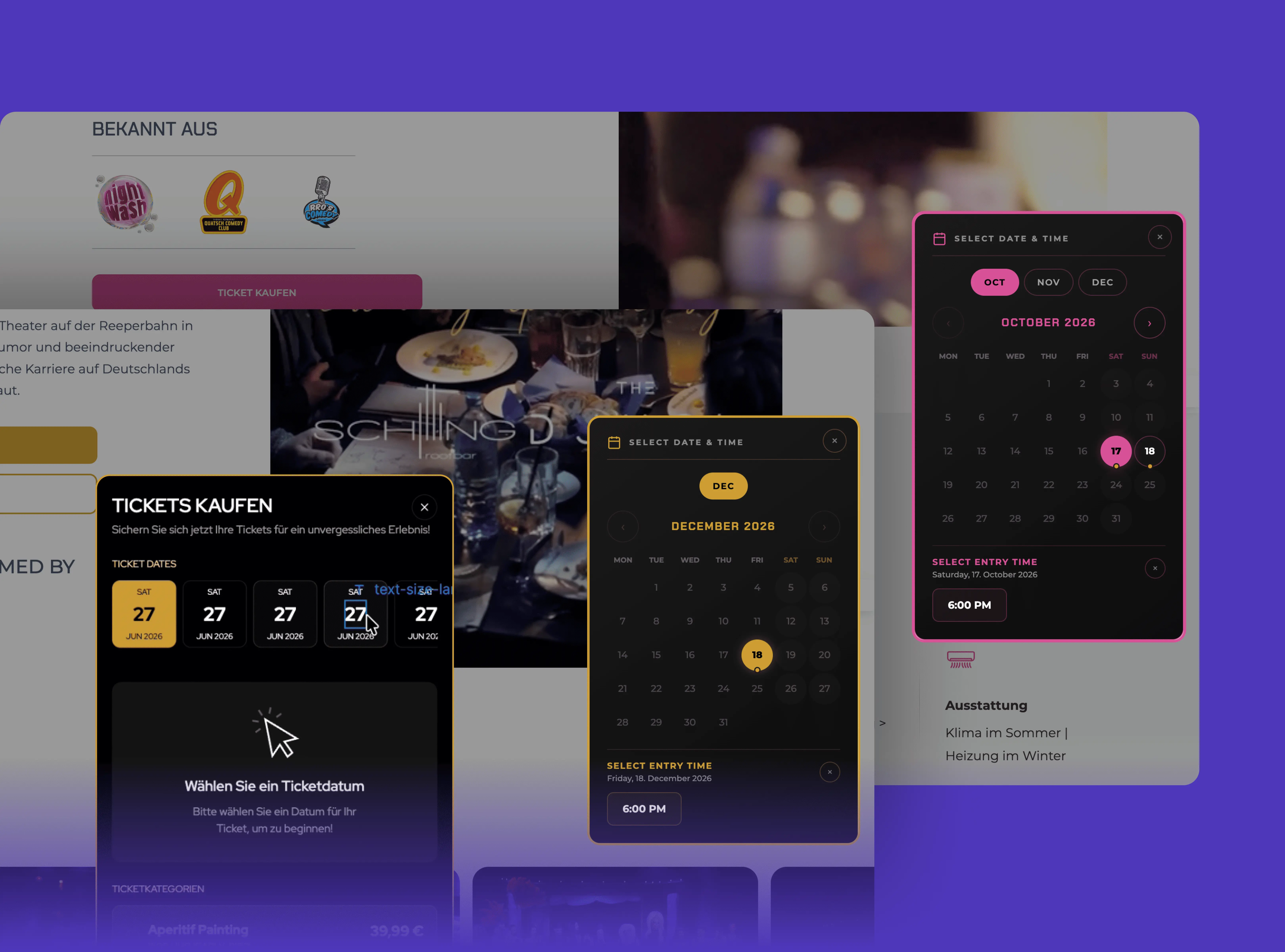
What started as one custom ticket picker slowly turned into a reusable booking system powering multiple event pages — each with its own content, colour, dates and booking logic, but all running on the same foundation.
I didn’t set out to build a ticket widget system - I was working on a ticket picker for Schilling Roofbar.
The requirement sounded fairly straightforward: pull available dates from Webflow CMS, let people choose a ticket category, and send them to Gastronaut with the right booking information already filled in.
Simple enough. Famous last words.
The first version was built for Brunch x Paint at Schilling Roofbar.
The dates came from Webflow CMS, while the ticket categories: Aperitif, Croissant, Hochtisch and Table — each had their own booking values.
Someone would choose a date, pick a category, and the widget would construct the correct Gastronaut booking URL.
That last part turned out to be more interesting than expected.
My first instinct was to use JavaScript’s URL() object to modify the booking parameters properly.
Technically, it worked.
Practically, it broke the URL.
Gastronaut’s booking links contain formatting that doesn’t behave nicely when passed through a standard URL parser. Characters inside values were getting encoded again, changing information the booking system expected to receive exactly as it was.
So instead of trying to make the URL more “correct”, I stopped parsing it altogether.
I treated the original link as a template and replaced only the parts I needed:
- Date.
- Time.
- Ticket category;
...and nothing else.
Sometimes the cleaner engineering solution is knowing what not to touch.
Or, in simpler terms: if the weird URL works, maybe leave the weird URL alone.
Then the same problem appeared somewhere else.
Frauenbad Heidelberg had several events that needed a more prominent ticket experience: Comedy Dinner, Drag Dinner, Marco Miele Magic Dinner, Burlesque Dinner, Pixel Zoo Ocean and others.
They were different events, but the interaction was almost identical.
That was the point where it stopped making sense to think in terms of individual widgets.
I needed a system.
So I built one reusable structure that could be adapted to each event by changing a few things:
- the theme colour
- the section that triggers the widget
- the Gastronaut booking URL
- the CMS dates behind it
The rest stays largely the same.
Which, to be fair, is much nicer than copying 300 lines of code and praying.
-------------------------------------------------
Each widget scans the event dates already being managed inside Webflow CMS and reconstructs them into something JavaScript can actually work with.
From there, it removes dates that have passed, groups the remaining dates by month, builds the calendar interface and connects every available time back to the booking URL.
This meant the CMS could remain the source of truth.
No duplicate date management.
No manually updating JavaScript every time someone added another event.
And no rebuilding the ticket UI for every page.
That was the point where it started feeling less like “custom code on a Webflow page” and more like a proper little system sitting between Webflow and Gastronaut.
-------------------------------------------------
There were plenty of tiny problems hiding underneath the polished version.
Dates were one of them.
Webflow wasn’t always returning month names consistently.
One event would output NOV.
Another would return DEZ.
Then September casually showed up as Sep.
Because apparently consistency was optional that day.
The parser was case-sensitive, so the date simply disappeared from the widget.
The fix was tiny:
normalize every month before doing anything with it.
I also added German month aliases so values like OKT, DEZ, MAI and MÄR could be interpreted alongside their English equivalents.
A one-line bug eventually became a rule for the whole system:
Never trust CMS text formatting when your logic depends on it. Normalize first.
-------------------------------------------------
The Pixel Zoo version pushed the system a little further.
Unlike the dinner events, its schedule wasn’t uniform.
Some dates needed to disappear completely.
Some needed to remain visible but show as sold out.
Certain weekdays had special time slots.
And it also had a Kombi-Ticket option that the other events didn’t need.
Instead of mixing all of that into one giant condition that future-me would hate, I kept them as separate pieces of configuration.
-
EXCLUDEDdecides whether a date exists. SOLDOUTdecides whether it can be booked.SPECIALdecides whether that date uses different time slots.
Each rule does one thing.
That made updates surprisingly simple.
When someone says:
“August 5 is sold out.”
That should be a data change.
-------------------------------------------------
Eventually, the same architecture was running across Comedy Dinner, Drag Dinner, Marco Miele Magic Dinner, Burlesque Glam Girls, Pixel Zoo Ocean and other Frauenbad experiences, alongside the inline Schilling Roofbar version.
Different branding.
Different schedules.
Different booking links.
Same underlying idea.
And that is probably my favourite part of the build.
Not that I made seven ticket widgets.
It’s that I eventually stopped having to.
-------------------------------------------------
A few things I’m taking away from this one:
- Build configuration before building copies.
- Normalize CMS data before trusting it.
- Keep special cases separate instead of creating one giant conditional.
- Don’t parse external URLs unless you actually need to.
- Scroll behaviour should respond to what the visitor can see, not arbitrary pixel positions.
- If changing one event requires touching the core logic, the system probably isn’t reusable enough yet.
And maybe the biggest one:
When the second version of the same thing appears, pay attention.
By the seventh, you’re not building a component anymore.
You’re maintaining a product.
Which is a much nicer way of saying:
I definitely did not plan for this to become this big.